After you have marked the staves and bar lines and you start the metronome, the cursor will already follow your score in the constant rhythm and tempo given in the Basic Settings.
But what if your score contains repeats, and/or is not played in a constant tempo or rhythm?
In the next step we will show you how you can make Five Lines even follow complex song structures.
The general workflow is as follows:
- Locate a repeat sign in the score. The sequence in which you process the repeat signs is not important.
- Tap on Repeats
 in the upper toolbar. The repeats tool bar opens.
 - Tap on the corresponding repeat sign in the toolbar.
- Tap in the score where the actual repeat sign is located.
- When you place the sign, the assigned bar shortly flashes in purple. If another bar flashes up than the intended one, adjust the placement accordingly.
- To adjust the placement, tap the repeat sign for about one second, until the current bar is highlighted and two buttons appear on the upper edge of the border around the sign. Now you can move the sign to the correct position.
- With the appearing
 button, you can delete the repeat sign if necessary.
 - With the
 button, you can change the size and color of the repeat sign. Also for some types of repeat signs you can change additional properties.
Use the same procedure for tempo and rhythm changes.
- For tempo changes tap on Tempo Changes
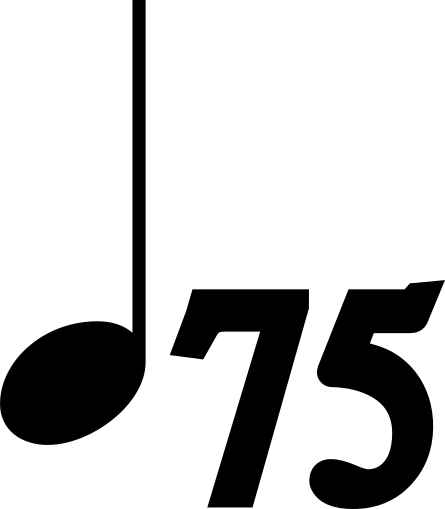 in the upper toolbar.
 - For rhythm changes tap on Rhythm Changes
 in the upper toolbar. If a rhythm is not available in the toolbar, use the X/Y rhythm
  and set the time signature with the button on the sign. (Tap and hold for one sec.)
The video shows a demonstration of this process.
After all mark up is placed you can check if there are any errors or inconsistencies. When you press  Five Lines tries to calculate the timeline of the song. If there are any inconsistencies, the corresponding signs are highlighted in red.
This can happen for example when you place a sign without a corresponding sign.
You can tap on the  button on the highlighted sign to get more information about the error.
After all errors are resolved, press play again to start the metronome, and you will see the cursor following the song correctly, and the metronome automatically adapting to rhythm and tempo changes.
In the next step we will show you how you can use an audio file to accompany your score.